Prices have not refreshed for a while. You are seeing the last rates we received.
How to create an OKX account: sign-up, ID check, 2FA and your first USDT
Creating an OKX account takes about three minutes, and you need both an email and a phone number. After that you verify your identity, usually within minutes, and then you can buy USDT on OKX P2P with your local currency. This guide follows the real phone screens step by step and ends with how to pick a seller for your first order.
Steps and screenshots checked: 2026-10-22. What changed from older guides: OKX now requires both email and phone, and the first screen asks for your country.
What you need
- An email address and a phone number you use every day; both are required.
- Your own government ID that is still valid: national ID, passport or driver’s licence, depending on your country.
- You must be 18 or older, and one ID can verify only one account.
- About 10 minutes in good light for the ID photos and face check.
Can you use OKX where you live?
What counts is the country you live in, not your nationality. The country list on the first sign-up screen marks places OKX does not serve as "not supported"; the full list is in the OKX Terms of Service. Do not pick a country you do not live in: your ID has to match it, and a mismatch fails verification or gets the account restricted later.
Nigeria: OKX P2P has a working Naira market right now: 26 sell ads, buying 1 USDT at about 1,417.00 NGN, with bank transfer and OPay among the payment methods. Binance P2P currently shows no Naira market in our data. Live numbers: USDT to Naira rate today.
Pakistan, Ghana, Kenya, the Philippines, Vietnam and many other countries also have OKX P2P sellers; check OKX P2P rates by country for yours.
Step 1: Open the sign-up page
The button below opens OKX sign-up with the referral code BTC6988 already in the link, so there is nothing to type. A phone browser or a computer both work. If you prefer the app, install it only from the download page on the official OKX website.
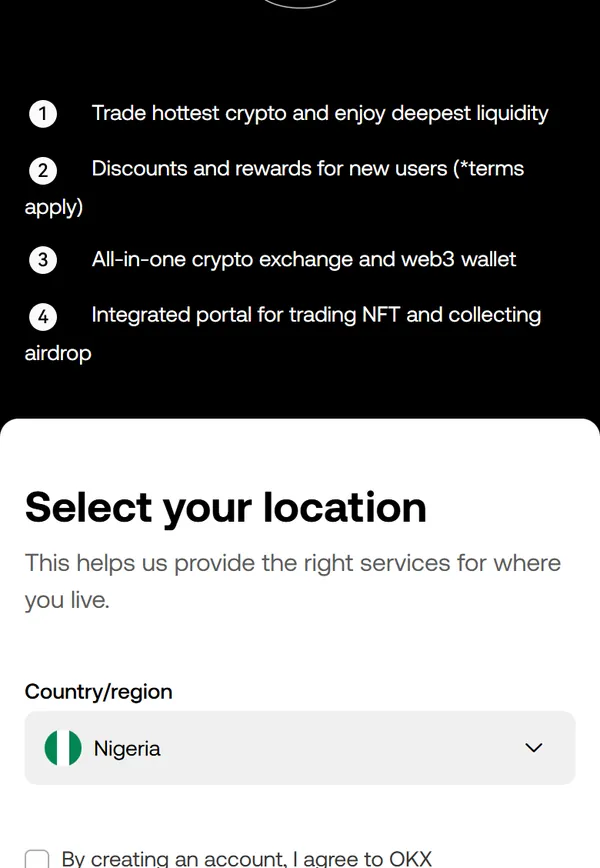
Step 2: Choose your country and accept the terms
The first screen is "Select your location". Tap Country/region and pick where you live. Then tick the box for the Terms of Service, Risk and Compliance Disclosure and Privacy Notice; the Next button only becomes active after that.
Step 3: Enter your email and the email code
Enter an email you check often and continue. OKX sends a 6-digit code that is valid for 10 minutes. In the app, this screen also has "Referral code (optional)": type BTC6988 there. With the button on this page the code is already applied.
Step 4: Add your phone number and the SMS code
Next, pick your country code, enter your number and type the code from the SMS. Both email and phone have to be verified to finish, which many older guides still get wrong.
- Choose the country code from the list and do not type it again in the number; in many countries you drop the leading 0 (for example a Nigerian 0803… number becomes 803…).
- Use a SIM card in your own name. Virtual (VoIP) numbers are usually refused.
Step 5: Set a password
The page lists the password rules (length, upper and lower case, numbers, symbols) and turns each one green when it is met. Use a password you do not use anywhere else. Your account now exists.
Step 6: Verify your identity
Tap your profile icon and open Identity verification (in the app: menu, then Account settings, then Identity verification). Then:
- Confirm your country and ID type; they must match the country you chose at sign-up.
- Enter your details exactly as on your ID: name, date of birth, ID number.
- Photograph your ID: valid, all four corners in the frame, no glare, no screenshots or photos of a screen.
- Do the face check: face inside the frame, no glasses, mask or hat, follow the prompts.
Most results arrive in minutes, at most about 24 hours. Three rules to remember:
- One ID, one account. Never lend your ID or use someone else’s.
- Verified details cannot be edited by you; only OKX support can change them.
- The verified name must match the bank account or wallet you pay from on P2P, or sellers can refuse to release your USDT.
Step 7: Secure your account the same day
- Passkey (marked as recommended): sign in with your phone’s fingerprint or face. It cannot be phished like a password or SMS code.
- Authenticator app: scan the QR code with Google Authenticator or a similar app, or type the key by hand. Write the key on paper; you need it to move to a new phone. App codes are safer than SMS, which can be hijacked through a SIM swap.
- Anti-phishing code: set a word only you know under advanced security settings. Real OKX emails include it; emails without it are fake.
After you change or remove your phone number, or reset a passkey, withdrawals and P2P selling are blocked for 24 hours. That is a safety hold, not a problem with your account.
Troubleshooting
No email code
Check spam and promotions folders, add OKX’s sender addresses (ending in @mailer1.okx.com, @mailer2.okx.com and similar) to your contacts, and wait 10 minutes before resending. If the page says sending failed, wait an hour or use another email.
No SMS code
Check the country code and drop the leading 0; turn off SMS-blocking apps; on dual-SIM phones move the SIM to slot 1; restart the phone. Ported numbers sometimes miss codes. If sending failed, wait about two hours and try again.
"Incorrect code" or account locked
Codes expire after 10 minutes, so request a new one. Several wrong codes in a row (around six) lock sign-in for a while; wait or contact OKX support.
"This email or phone is already registered"
You already have an OKX account. Log in and use Forgot password instead of creating a new one.
The sign-up link does not open
Try another browser or network. If it still fails, sign up in the OKX app and type BTC6988 in the referral code field.
Identity verification rejected
Common reasons: blurry or cropped ID, glare, a screenshot instead of a photo, glasses or a mask in the selfie, details that do not match the ID, or an ID from a different country than the one you chose. Fix it and submit again.
Buy your first USDT on OKX P2P
Once verified, open P2P from the Buy crypto menu. Choose Buy, USDT, your currency and payment method; the list shows each seller’s price, limits, completion rate and payment methods.
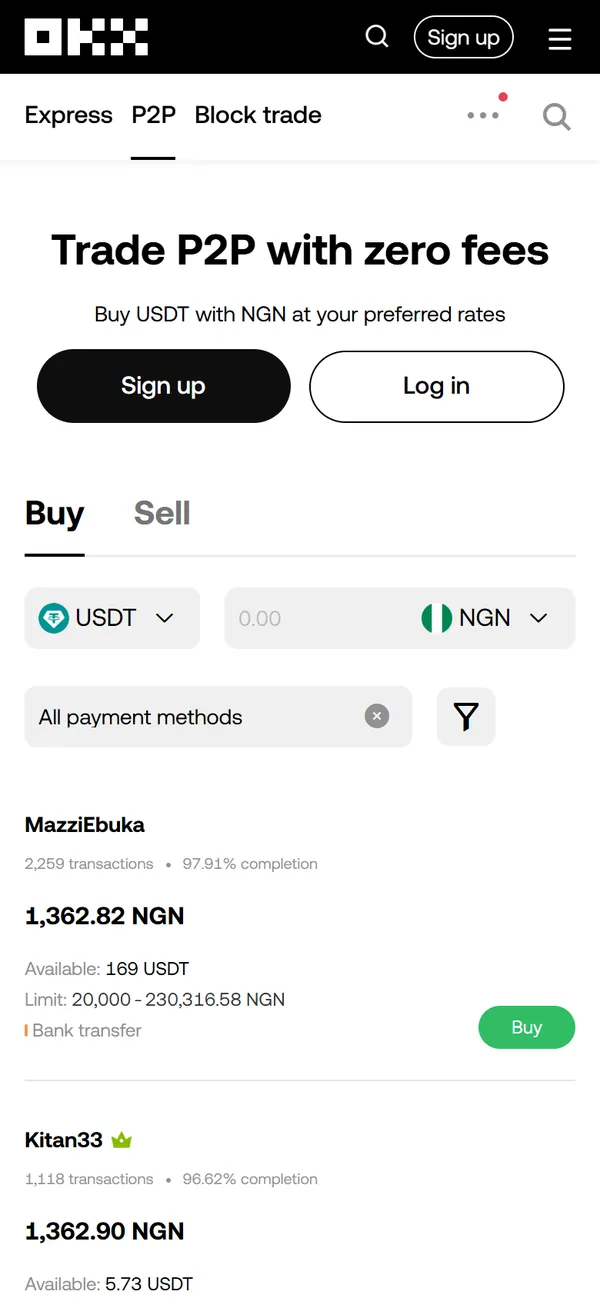
- Pick a seller with many orders and a high completion rate whose limits fit your amount and who accepts your payment method.
- Enter the amount you want to pay and place the order. The price is locked for a short countdown, then refreshes.
- Pay on time from an account in your own name, leave the payment note empty, then tap that you have paid. The seller releases USDT to your account.
Start small for your first order. Before you buy, compare prices: USDT P2P rates in 46 currencies shows OKX, Binance, Bybit, Bitget and HTX side by side, and Find a seller lists the cheapest ads whose limits fit your amount. Full walkthrough: How to buy USDT on OKX P2P.
No account yet? Open OKX sign-up
Common questions
Do I need both an email and a phone number for OKX?
Yes. The current sign-up asks for your email and its code first, then your phone number and its SMS code, then a password. You cannot finish with only one of them.
Where do I enter the OKX referral code? Can I add it later?
If you open sign-up with the button on this page, the code BTC6988 is already in the link and applied automatically. If you sign up inside the OKX app, type BTC6988 in the "Referral code (optional)" field on the email step. The referral is fixed when the account is created; there is no official way to add it later, and anyone offering to "attach a code in the back end" is a scammer.
Do I need an ID to create an OKX account?
Not to create the account. To buy or sell on P2P, deposit or withdraw, you need identity verification with your own government ID and a face check.
Can I have more than one OKX account, or use a family member’s ID?
One ID can verify only one account, and it must be yours. Borrowed or bought verified accounts get frozen, often with the money inside.
How long does OKX verification take, and what if it is rejected?
Usually a few minutes, at most about 24 hours. Rejections are mostly blurry or cropped ID photos, glare, screenshots of an ID, or a selfie with glasses, a mask or a hat. Retake the photos and submit again.
Does OKX charge for sign-up or P2P?
Sign-up and verification are free, and OKX charges no platform fee on P2P. Your cost is the seller’s price, so compare rates before you buy.
Why can I not withdraw after changing my phone number?
After you change or remove your phone number, or reset a passkey, OKX blocks withdrawals and P2P selling for 24 hours to protect the account. It lifts automatically.
Where should I download the OKX app?
Only from the download page on the official OKX website, and check the developer name before installing. Do not install APK files people send you; fake apps steal accounts.
How soon can I buy USDT after signing up?
The account takes a few minutes; once verification is approved you can place a P2P order straight away.