How to buy USDT on Binance P2P, step by step
On Binance P2P you send local money to a seller by bank transfer, UPI, mobile wallet or another method, and the seller releases USDT to you once the money arrives. Binance holds the seller’s USDT until the order is done. Here is the whole process on a phone, with real screenshots.
Screenshots and steps checked: 2026-10-08
Binance P2P does not serve every currency. In Nigeria, for example, there is no Naira market on Binance. In that case use the OKX P2P guide.
Step 1: Create a Binance account
The button below opens the Binance sign-up page with the referral code already filled in. Enter your email or phone number, tap Register, type the code Binance sends you and set a password.
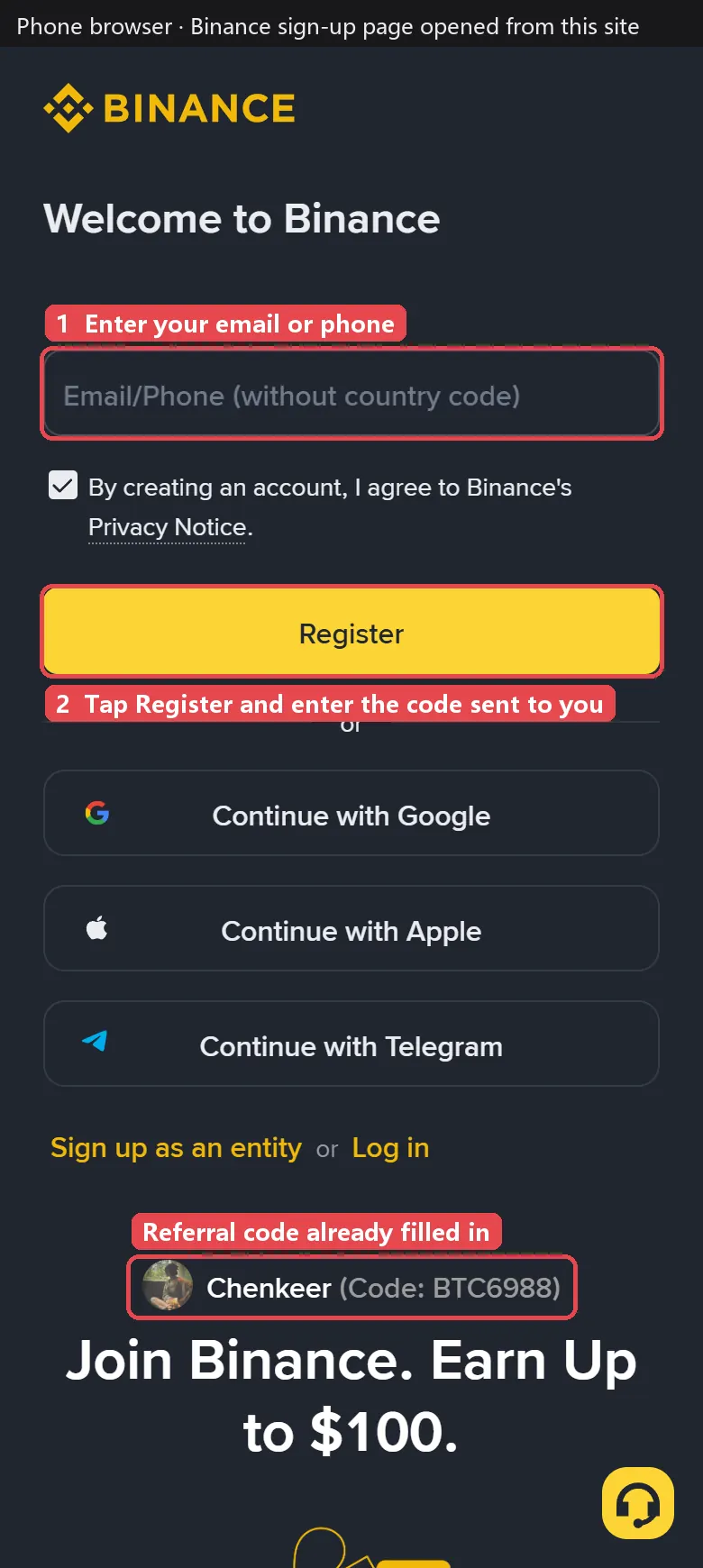
If you sign up inside the Binance app instead, enter the referral code BTC6988 by hand on the sign-up screen.
Step 2: Verify your identity
Binance asks for identity verification before you can trade on P2P. Open your profile, choose Verification, and follow the prompts: a photo of your ID and a quick face check. It usually takes minutes.
Step 3: Open P2P and set your filters
Tap Trade, then P2P (on the website it is under Buy Crypto). Set three things before you look at the list:
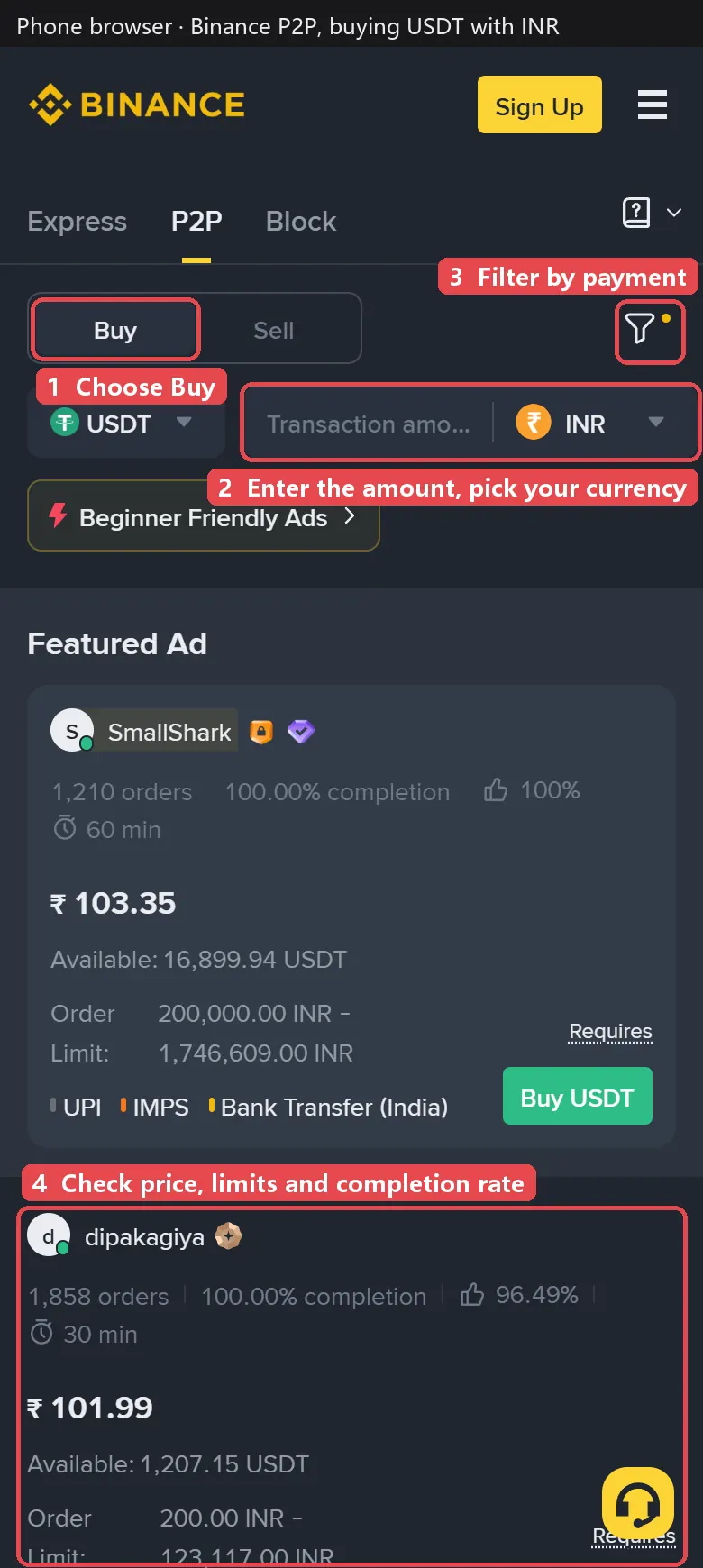
- Choose Buy and make sure the coin is USDT.
- Enter your amount and currency. Without an amount, the list mixes in sellers who only accept large orders.
- Filter by payment method with the funnel icon, so you only see sellers who accept the way you want to pay.
Step 4: Pick a reliable seller
Each ad shows the price, how many orders the seller has completed, the completion rate, the average release time, the available USDT and the order limit. Check them in this order:
- Completion rate and order count: go for 98% or higher and hundreds of orders or more.
- Order limit: your amount has to fit between the minimum and maximum. In the screenshot, the first seller only takes orders from 200,000 INR.
- Price: among reliable sellers, take the cheaper one. Be careful with prices far below everyone else.
- Look past the featured ad: the ad at the top is promoted, not necessarily the cheapest. In the screenshot it costs ₹103.35 while the next seller asks ₹101.99.
To compare sellers across Binance, OKX, Bybit and other platforms at once, use the P2P seller finder: enter your amount and payment method and it lists the cheapest sellers who accept it right now.
Step 5: Place the order and pay
Tap Buy USDT on the ad, enter the amount and confirm. The order page shows the seller’s payment details and a countdown, usually 15 minutes.
- Pay from your own account, in your own name, to the exact details on the order page, for the exact amount.
- Only add a payment note if the order page or the seller asks for one.
- Go back to the order and tap the button that says you have paid. Never tap it before paying, and never cancel an order after paying.
Step 6: Wait for the seller to release
Once the seller sees your money, they release the USDT and the order shows Completed. Most orders finish within minutes. If the time runs out and nothing happens, tap Appeal and upload your payment proof.
Step 7: Where your USDT goes
USDT bought on P2P lands in your Funding wallet. To trade it on Binance, transfer it to your Spot wallet. To send it to your own wallet, use Withdraw and pick the network carefully (for example TRC20 or BEP20). The network must match the receiving address, or the funds may be lost.
Binance P2P prices right now
Median price of the top Binance P2P sellers for 1 USDT, updated every 2 minutes.
| Currency | Buy 1 USDT | Sell 1 USDT | Ads online |
|---|---|---|---|
 USDT to INR USDT to INR |
102.14 | 105.47 | 1,000 |
 USDT to PKR USDT to PKR |
285.52 | 286.42 | 508 |
 USDT to IDR USDT to IDR |
17,889 | 17,870 | 259 |
 USDT to BDT USDT to BDT |
127.34 | 128.22 | 325 |
 USDT to VND USDT to VND |
26,042 | 26,050 | 485 |
 USDT to LKR USDT to LKR |
336.34 | 335.74 | 140 |
 USDT to NPR USDT to NPR |
166.09 | 166.91 | 52 |
 USDT to CNY USDT to CNY |
6.660 | 6.660 | 1,744 |
 USDT to HKD USDT to HKD |
7.900 | 7.890 | 167 |
 USDT to KHR USDT to KHR |
4,098 | 4,066 | 20 |
 USDT to KES USDT to KES |
129.58 | 129.84 | 121 |
 USDT to EGP USDT to EGP |
52.95 | 52.93 | 180 |
Updated · All Binance P2P currencies →
How to avoid P2P scams
- Skip prices that look too good. USDT far below the market often comes with problem money, and accounts that receive it are more likely to be frozen.
- Pay only from your own account. Never pay on behalf of someone else or use a borrowed account.
- Keep everything inside the order. Chat, receipts and proof all stay in the order so an appeal has evidence.
- Ignore “support” messages outside the app. Binance support only handles orders inside the app or website and never asks you to send extra money to unlock anything.
Common questions
Does Binance charge a fee to buy USDT on P2P?
Binance does not charge buyers a trading fee on P2P. You pay the seller the price shown times the amount. Your bank or wallet may still charge its own transfer fee.
What is the minimum amount I can buy?
It depends on the seller. Each ad shows an order limit, and many start from small amounts while others only take large orders. Type your amount in the amount box and only sellers who accept it stay in the list.
How long does a Binance P2P order take?
Most orders finish within a few minutes of paying. Each ad shows the seller’s average release time, so pick a short one if you are in a hurry.
What if the seller does not release my USDT?
Remind the seller in the order chat first. If the payment window passes and nothing happens, tap Appeal on the order page and upload your payment proof. Binance support will step in. Never cancel an order you have already paid.
Why is the P2P price different from the bank rate?
Sellers set their own P2P prices based on local supply and demand, so 1 USDT often costs more than 1 dollar at the official rate. This site tracks that gap every 2 minutes.