Prices have not refreshed for a while. You are seeing the last rates we received.
How to create a Binance account: sign-up, ID check, 2FA and your first USDT
Creating a Binance account takes two or three minutes with an email or phone number, and needs no ID. Identity verification comes next and usually takes minutes; after that you can buy USDT on Binance P2P with your local currency. This guide follows the real phone screens, gives the fix for each place people get stuck, and ends with your first P2P order.
Steps and screenshots checked: 2026-10-21 (phone browser).
What you need
- An email address or phone number you use every day, for codes, logins and password resets.
- Your own valid government ID: national ID, passport or driver’s licence, depending on what Binance accepts in your country.
- You must be 18 or older; one person can have only one verified personal account.
- About 10 minutes in good light for the ID photos and face check.
Can you use Binance where you live?
What counts is the country you live in, not your nationality. Binance.com does not serve every country, and the rules change, so check before you start:
- United States: Binance.com does not accept US residents. Binance.US is a separate company with its own sign-up and fewer features.
- United Kingdom: Binance stopped onboarding new UK users in October 2023.
- European Union: in June 2026 Binance said it would limit new registrations, deposits and many services in several EU countries, including France, Italy, Spain and Poland, from 1 July 2026, while keeping withdrawals open. Reports since then differ on how strictly this is applied, so follow what the sign-up page and Binance’s notices say for your country.
- Canada and the Netherlands: Binance withdrew from both in 2023.
- India, Pakistan, Bangladesh, the Philippines, Vietnam: sign-up and verification work with a local ID or passport, and Binance P2P has active local-currency markets.
- Nigeria: you can create and verify an account, but Binance P2P currently shows no Naira market in our data. To buy USDT with Naira, see the OKX sign-up guide; OKX P2P has Naira sellers right now.
Do not pick a country you do not live in to get through sign-up. Your ID has to match it, and a mismatch fails verification or gets the account restricted later. If the page says your region is not supported, that is a real restriction, not a bug.
Step 1: Open the sign-up page
The button below opens Binance’s sign-up page with the referral code BTC6988 already in the link, so you do not have to type it; further down the page you will see "Join me on Binance", which shows the invite link worked. A phone browser or a computer both work.
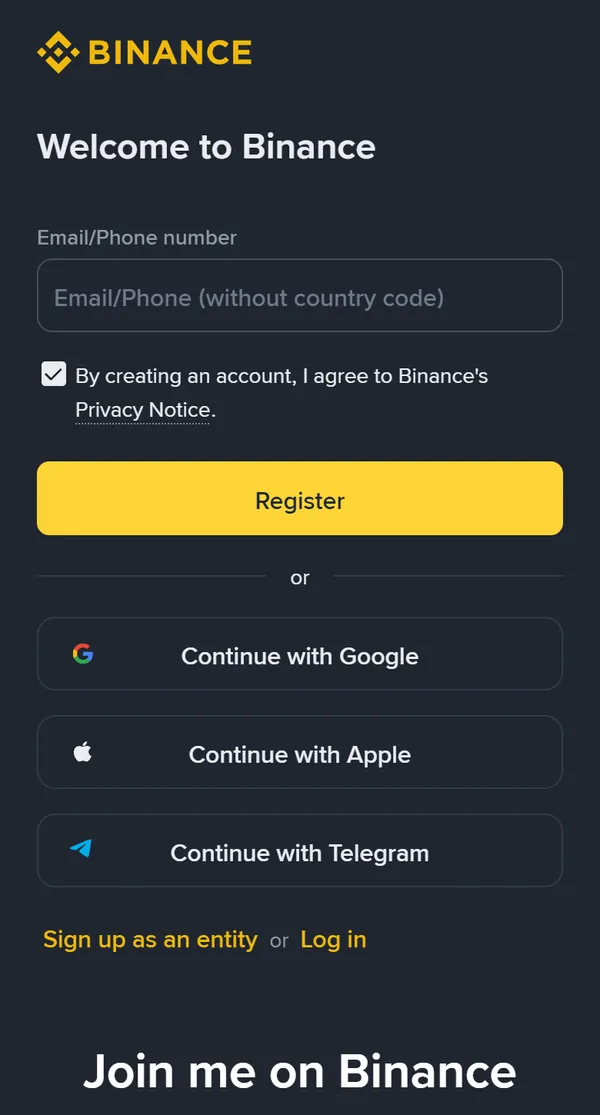
If you prefer the app, get it only from Binance’s official website or your phone’s app store and check the developer name. Never install an APK someone sends you. When signing up inside the app, type BTC6988 in the "Referral ID (optional)" field.
Step 2: Enter your email or phone
Fill in the "Email/Phone number" field with one of them:
- Phone: type the number without the country code; you choose the code on the next screen.
- Email: any address you check every day; Gmail and Outlook work well.
The Privacy Notice box underneath is already ticked. Tap the yellow Register button. A puzzle or slider check may appear; just follow it.
You can also tap Continue with Google, Apple or Telegram if you already use one of those. You will then log in the same way in future.
Step 3: Enter the 6-digit code
Binance sends a 6-digit code to your email or phone. It is valid for 30 minutes, and only the newest code works. If nothing arrives, do not hammer the resend button; work through Troubleshooting below.
Step 4: Set a password
Use at least 8 characters, including an uppercase letter and a number; the page tells you what is still missing. Do not reuse a password from another site. Once it is set, your account exists and you land on the Binance home screen.
Step 5: Verify your identity
Tap your profile icon at the top right and open Identity Verification; in the app there is usually a "Verify now" prompt on the home screen. Then:
- Choose your country of residence. It decides which IDs and services you get.
- Choose your ID type and enter your details: name, date of birth and ID number, exactly as printed on the ID.
- Photograph your ID. Valid document, all four corners visible, no glare, no screenshots or photos of a screen. On a computer without a camera, scan the QR code to continue on your phone.
- Do the face check. Remove hat and glasses, turn off beauty filters, use good light and follow the prompts.
- Confirm your details. Once confirmed they cannot be edited, so check them before you submit.
Most results come within minutes; manual reviews are usually done within 48 hours. When you pass, the page shows Verified with your account limits. At the time of our check, the standard level allowed fiat deposits and withdrawals of $50,000 a day, crypto withdrawals of 8 million USDT a day and unlimited P2P trading. That is plenty for everyday P2P; for higher fiat limits Binance asks for proof of address.
Step 6: Secure your account (do it today)
Open Account Security. The security check at the top lists what is done and what is missing: two-factor authentication, identity verification, anti-phishing code and withdrawal whitelist.
- Passkey (biometrics): confirm logins and withdrawals with your fingerprint or face. No codes to type, and phishing sites cannot steal it.
- Authenticator app: Binance Authenticator or Google Authenticator. Write the backup key on paper and keep it safe; you need it when you change phones. Do not keep it as a screenshot.
- Anti-phishing code: a word only you know. Every real Binance email will show it; emails without it are fake.
- Withdrawal whitelist (optional): withdrawals can only go to addresses you saved in advance, so a thief cannot easily move your coins.
Troubleshooting
The email code does not arrive
Check spam and promotions, add Binance’s sender address to your contacts, and make sure the mailbox is not full and the address is spelled right. Wait a minute or two before resending; resending many times can get you rate-limited. If it still fails, sign up with another email.
The SMS code does not arrive
Check the country code and that you did not type it again in front of the number; turn off SMS-blocking apps; move somewhere with better signal or restart the phone. Some countries are outside Binance’s SMS coverage: try the voice code if offered, or sign up with email instead.
The code is wrong or expired
Codes last 30 minutes and only the latest one counts. If you resent the code, use the newest message.
It says the account already exists
That email or phone was registered before. Log in instead and use Forgot password if needed. Do not open a second account.
It says my region is not supported
Binance serves users by country of residence and some places are restricted (see the country list). Do not pick another country to get around it; your ID will not match and the account will be restricted.
Verification was rejected
Common causes: blurry or cropped ID, glare, a screenshot or photo of a screen, a hat, glasses or filter during the face check, details that do not match the ID, or a country that does not match the document. Fix it and submit again.
Review has taken more than 48 hours
Ask Binance support in the app. Do not keep resubmitting, and ignore anyone who messages you offering to "speed up" verification; that is a scam.
Buy your first USDT on Binance P2P
Once verified, tap Buy Crypto and choose P2P, or open p2p.binance.com. Pick Buy, USDT and your currency. Here is the Indian rupee market as an example:
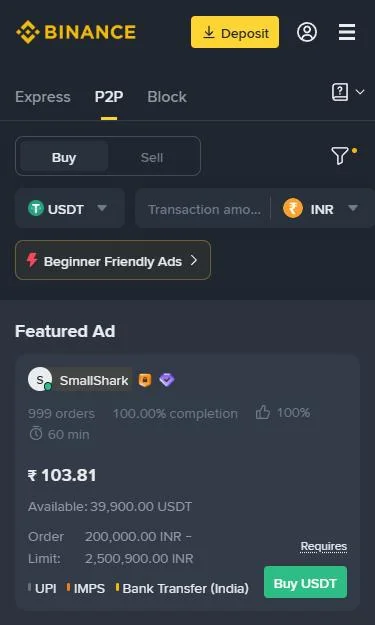
- Pick a seller. Compare price, order limit, payment method and payment window, and prefer sellers with many orders and a high completion rate. The "Featured Ad" at the top is a paid slot and not always the cheapest; scroll down. First-timers can tap "Beginner Friendly Ads".
- Enter the amount. Tap Buy USDT, type how much you will pay, and the app shows how much USDT you receive. Some ads say "Requires Verification" for extra checks set by the seller.
- Pay on time. Pay from an account in your own verified name, leave the payment note empty, pay within the window shown on the ad, then tap the button in the order to tell the seller you have paid. The seller releases the USDT once the money arrives.
Read the seller’s terms before you order; many require payment from your own named account and no crypto words in the transfer note. Start with a small first order to learn the flow.
Binance is not always the cheapest. Before you order, compare live P2P rates across platforms: USDT to INR rates, Binance P2P rates by country, or the seller finder for your amount and payment method. The full walkthrough is in How to buy USDT on Binance P2P.
Not signed up yet? Open Binance sign-up
Avoid scams
- Never share a code, not even with someone claiming to be Binance support. Support never asks for your password, codes or a transfer.
- Never let anyone sign up or verify for you, and never lend your ID. An account verified with someone else’s ID can be frozen or emptied at any time.
- Download the app only from the official site or app store. Ignore download links in ads, groups and messages.
- Stay inside the P2P order. A seller who asks you to move to WhatsApp or Telegram, or to cancel the order and pay anyway, is setting up a scam.
Common questions
Do I need an ID to create a Binance account?
Not to create the account; an email or phone number is enough. To buy or sell on P2P, deposit or withdraw, you need identity verification with your own government ID and a face check.
How long does Binance verification take?
Most applications get a result within minutes. Those that go to manual review are usually done within 48 hours. If it takes longer, ask Binance support in the app; do not resubmit again and again.
Can I use Binance without verification?
Hardly. P2P trading, fiat deposits and withdrawals all require verification, so an unverified account can do very little.
Is Binance available in the EU, UK and US?
In the US, Binance.com does not accept users; Binance.US is a separate company. In the UK, Binance stopped taking new users in 2023. In the EU, Binance said it would limit new sign-ups and many services in several countries from 1 July 2026. Check the sign-up page and Binance’s own notices for your country.
Where do I enter the referral code, and can I add it later?
If you open sign-up with the button on this page, the code BTC6988 is already in the link and applied automatically; the page shows "Join me on Binance". In the Binance app, type BTC6988 in the "Referral ID (optional)" field. The code is linked when the account is created and cannot be changed afterwards.
Why was my verification rejected?
Usually a blurry or cropped ID photo, glare, a screenshot or photo of a screen, a selfie with a hat, glasses or a beauty filter, details that do not match the ID exactly, or a country of residence that does not match the document. Fix the issue and submit again.
Can I change my name or country after verification?
Not by yourself. Verified details cannot be edited once you confirm them; only Binance support can help. Enter everything exactly as on your ID the first time.
Personal or entity account: which one do I need?
A personal account, which is what the email or phone field on the sign-up page creates. "Sign up as an entity" is for companies and needs company documents. The account type cannot be changed after sign-up.
Can I have more than one Binance account?
One person can have only one verified personal account, and an ID cannot verify a second one. Borrowed or bought verified accounts get frozen, often with the money inside.
Email or phone: which is better?
Either works; it is the same field. Email codes tend to arrive more reliably and do not depend on SMS coverage. Whichever you use, add the other one later in Security as a backup.
Does Binance charge for sign-up or P2P?
Sign-up and verification are free. Taking someone’s P2P ad is normally fee-free for you; your cost is the price the seller sets, so compare rates before you buy.
What is the minimum age?
You must be at least 18 to open and verify a Binance account.