How to sell USDT on Binance P2P, step by step
Selling USDT on Binance P2P means a buyer sends local money to your bank or wallet, and you release the USDT once you see the money. Binance locks your USDT while the order is open. The step that matters most: check your own bank app before you release. Here is the whole process with real screenshots.
Screenshots and steps checked: 2026-10-08
Step 1: Move USDT to your Funding wallet
P2P sells come out of your Funding wallet. If your USDT is in Spot, open Wallet, tap Transfer and move it from Spot to Funding. If you are sending USDT in from another wallet, pick the same network on both sides when you deposit.
No Binance account yet? Steps 1 and 2 of the Binance P2P buying guide cover sign-up and verification.
Step 2: Add a payment method
In P2P, open your profile, then Payment Methods, and add the bank account, UPI ID or wallet where you want to be paid. It must be in the same name as your verified Binance account.
Step 3: Open P2P and choose Sell
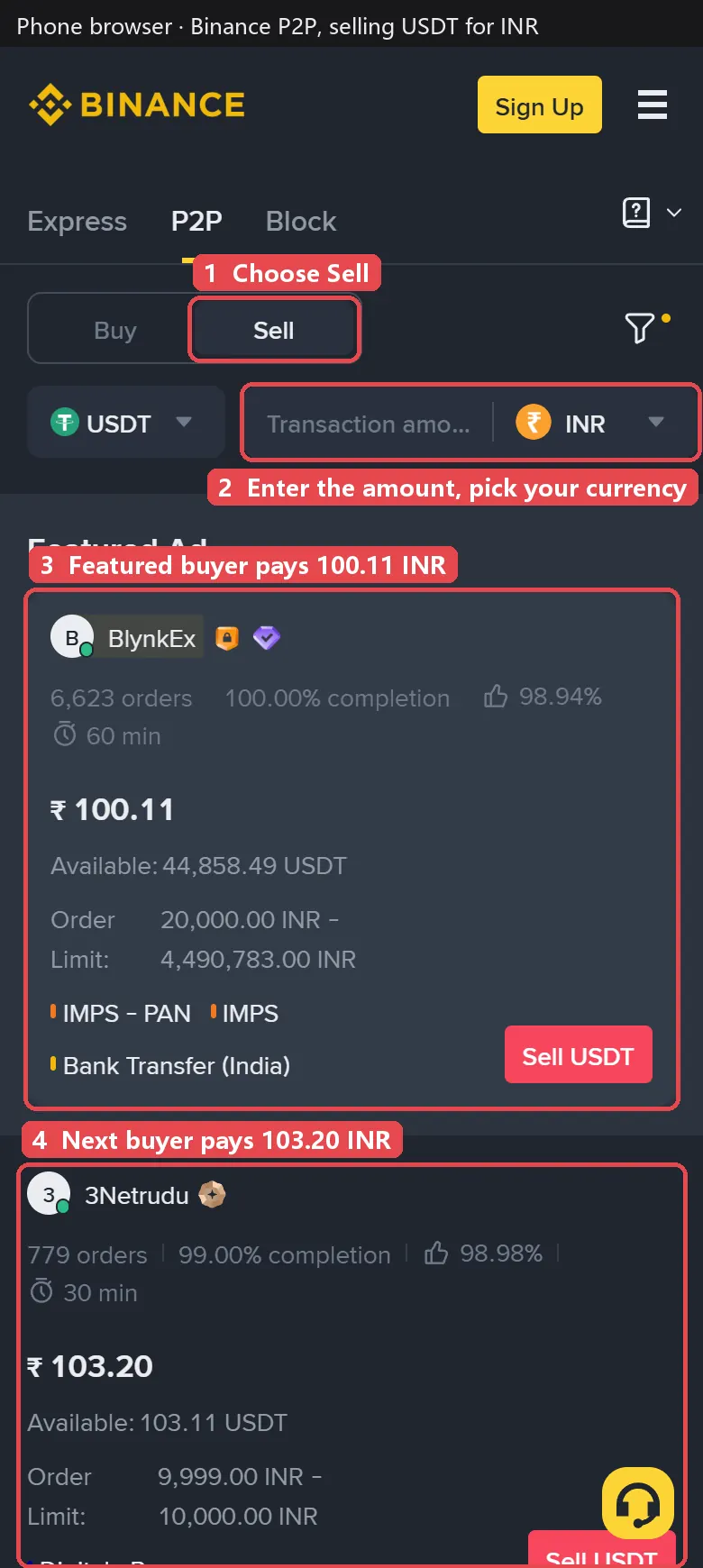
- Choose Sell and check the coin is USDT.
- Enter the amount and your currency, so you only see buyers whose limits fit.
- Filter by payment method to match the account you added.
Step 4: Pick a buyer
When selling, a higher price means more money for you. Look at:
- Price: the featured ad at the top is promoted, not the best offer. In the screenshot it pays ₹100.11 per USDT while the next buyer pays ₹103.20, about 3% more.
- Order limit: that higher offer only accepts orders between ₹9,999 and ₹10,000, so it only works if you sell about 97 USDT. Your amount must fit inside the limit.
- Track record: prefer buyers with hundreds of orders and a completion rate of 98% or more.
- Payment method: the buyer must pay with a method you added.
To see which platform pays the most for USDT in your currency right now, compare the Sell column on the USDT P2P rates page.
Step 5: Place the order
Tap Sell USDT on the ad, enter the amount and confirm. Your USDT is locked by Binance, and the buyer sees your payment details and has a time limit to pay.
Step 6: Check the money, then release
When the buyer marks the order as paid, that does not mean the money has arrived.
- Open your bank or wallet app and find the payment in your own transaction history. SMS alerts and screenshots from the buyer can be faked.
- Check that the amount matches the order and the sender’s name matches the buyer’s verified name.
- Only then go back to the order, tap the release button and confirm with your security code.
Binance P2P sell prices now
What the top Binance P2P buyers pay for 1 USDT, updated every 2 minutes.
| Currency | Sell 1 USDT | Buy 1 USDT | Buyers online |
|---|---|---|---|
 USDT to INR USDT to INR |
105.48 | 102.14 | 4,310 |
 USDT to PKR USDT to PKR |
286.36 | 285.19 | 1,212 |
 USDT to PHP USDT to PHP |
62.79 | 62.95 | 237 |
 USDT to IDR USDT to IDR |
17,864 | 17,886 | 360 |
 USDT to BDT USDT to BDT |
127.97 | 127.38 | 1,562 |
 USDT to VND USDT to VND |
26,132 | 26,030 | 749 |
 USDT to LKR USDT to LKR |
335.52 | 336.49 | 265 |
 USDT to NPR USDT to NPR |
167.60 | 166.25 | 228 |
 USDT to CNY USDT to CNY |
6.660 | 6.660 | 2,071 |
 USDT to HKD USDT to HKD |
7.890 | 7.900 | 163 |
 USDT to KHR USDT to KHR |
4,062 | 4,099 | 41 |
 USDT to KES USDT to KES |
129.81 | 129.59 | 582 |
Updated
Fake payments and frozen accounts
The two real risks when selling are releasing without being paid, and having your bank account frozen because the money you received came from fraud. You cannot remove the second risk completely, but you can lower it a lot:
- Never release on a screenshot or SMS. Only the balance in your own app counts.
- Refuse third-party payments. The money must come from the buyer’s own account in the buyer’s own name.
- Be careful with buyers paying far above the market. An unusually high price is a common sign of problem money.
- Use a separate account for P2P and keep records: order numbers, chat and bank statements. If your bank asks about a payment, these show it was a normal trade.
- Never trade outside the order. Without an order there is no escrow, no appeal and no record.
Common questions
Does Binance charge a fee to sell USDT on P2P?
Binance does not charge a trading fee for normal P2P orders. The buyer pays you the price shown times the amount.
How long does it take to receive the money?
Buyers must pay within the order time limit, usually 15 minutes. Most orders finish within that time.
The buyer marked the order as paid but I have no money. What do I do?
Do not release. Check your bank or wallet app again. If the money is not there when the time runs out, tell the buyer in the chat and open an appeal. Binance support will review the proof.
The payment came from a different name. Should I release?
No. A payment from someone other than the buyer is a third-party payment. Do not release; open an appeal and return the money only through the process support gives you.
Can I undo a release?
No. Once you release, the USDT goes to the buyer. That is why you only release after you see the money in your own bank or wallet app.