Prices have not refreshed for a while. You are seeing the last rates we received.
How to create a Bitget account: sign-up, ID check, 2FA and your first USDT
Creating a Bitget account takes a few minutes with an email or phone number. Identity verification usually finishes within an hour. To buy on P2P you also need both a phone number and an email linked. This guide follows the real phone screens and ends with your first P2P order.
Steps and screenshots checked: 2026-10-21 (phone browser).
What you need
- An email address and a phone number. One is enough to sign up, but P2P needs both linked.
- Your own valid ID: national ID card, passport, driver’s licence or residence permit, depending on your country.
- You must be 18 or older; verification works on one account only.
- About 15 minutes in good light for the ID photos and face check.
Can you use Bitget where you live?
As of 2026-10-21, the FAQ on Bitget’s verification page says it does not serve users in: Afghanistan, Austria, Canada, Central African Republic, Crimea, Cuba, DR Congo, Donetsk, France, Germany, Guinea-Bissau, Haiti, Hong Kong, India, Iran, Iraq, Italy, Japan, Kazakhstan, Lebanon, Libya, Luhansk, North Korea, Singapore, Somalia, South Sudan, Spain, Sudan, the United States (including its territories) and Yemen.
Nigeria, Pakistan, the Philippines, Vietnam, Indonesia, Bangladesh, Egypt, the UAE and many other countries are not on that list, and Bitget P2P has local-currency sellers there. Check Bitget P2P rates by country for yours. Pick the country you really live in: your ID must match it, and a VPN or a false country gets the account restricted.
Step 1: Open the sign-up page
The button below opens Bitget’s sign-up page with the referral code already filled in and locked (the grey field), so there is nothing to type. Make sure the address is bitget.com, and ignore "alternative links" from ads or chat groups.
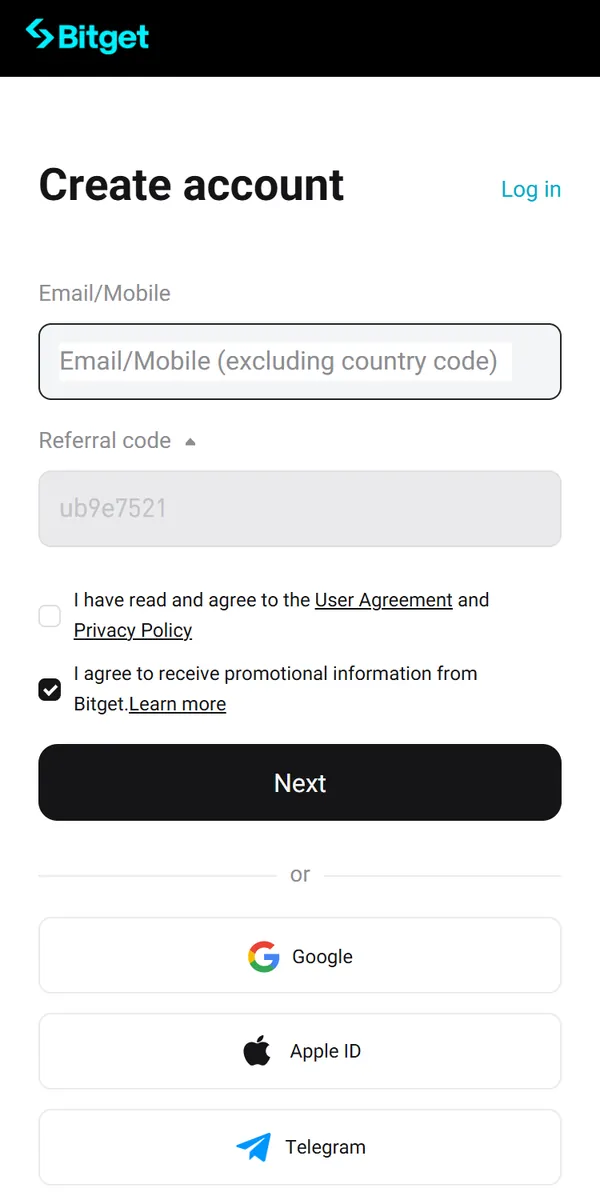
If you use the app, get it only from Bitget’s official website or your phone’s app store, and check the developer name.
Step 2: Enter your email or phone
- Phone: type the number without the country code; you choose the code separately.
- Email: any address you check daily. You will need both later for P2P, so start with either.
There are two checkboxes. "I have read and agree to the User Agreement and Privacy Policy" must be ticked or Next will not work. "I agree to receive promotional information" is ticked by default; untick it if you prefer, it does not affect sign-up. Then tap Next.
Google, Apple ID and Telegram sign-up also work; you will then log in the same way.
Step 3: Code and password
Pass the puzzle check, then enter the 6-digit code sent to your email or phone (valid for 10 minutes). An SMS code can be resent only after 120 seconds.
Set a password of 8 to 32 characters with at least one number, one uppercase letter and one special character. Do not reuse a password from another site. Your account now exists.
Step 4: Verify your identity
Open your profile and choose Identity Verification from the account menu. Then:
- Choose your country of residence and the country that issued your ID.
- Choose the ID type and photograph it: all four corners, no glare, no black-and-white copies or screenshots.
- Do the face check without hat, glasses or mask, in good light.
Bitget says results usually come within an hour and no later than 4 hours. Once approved, the page shows Verified for basic identity verification. At the time of our check that level unlocked withdrawals of 3 million USDT a day, crypto deposits, fiat deposits and P2P trading, which is plenty for everyday P2P. A higher level needs proof of address from the last 3 months, such as a bank statement or utility bill.
Step 5: Secure your account (do it today)
Open the Security Center. A banner at the top lists what is still missing.
- Google Authenticator or a passkey: turn on at least one. Write the authenticator backup key on paper; you need it when you change phones.
- Link both phone and email: P2P checks for both.
- Anti-phishing code: under advanced settings. Real Bitget emails and texts will show it.
- Withdrawal whitelist (optional) limits withdrawals to saved addresses, and "cancel withdrawal" lets you pull back a withdrawal within 1 minute.
Note: after you change or remove your authenticator, phone, email, fund password or login password, payments and withdrawals are disabled for 24 hours. Verified accounts also get face verification switched on automatically for high-risk actions.
Troubleshooting
The email code does not arrive
Check spam and promotions, make sure the address is spelled right and the mailbox is not full, wait a minute or two and resend. If it still fails, use another email.
The SMS code does not arrive
Check the country code and do not type it again in the number; turn off SMS-blocking apps. Resend is allowed after 120 seconds and may come through a different SMS route, so a second try often works.
The Next button does nothing
Tick "I have read and agree to the User Agreement and Privacy Policy" first.
It says the account already exists
Log in instead and use Forgot password if needed. Do not open a second account.
My country is not in the verification list
Bitget does not serve it (see the list). Do not choose another country; your ID will not match and the account will be restricted.
Verification was rejected
Fix the reason shown (photo quality, face check, mismatched details) and resubmit. You get up to 5 attempts in 24 hours.
"Additional verification" pops up when I tap Buy
P2P needs identity verification, a linked phone and a linked email. Tap "Set up now" next to whichever is missing.
Buy your first USDT on Bitget P2P
Tap Buy Crypto and open P2P trading. Choose Buy, USDT and your currency. Here is the Nigerian naira market:
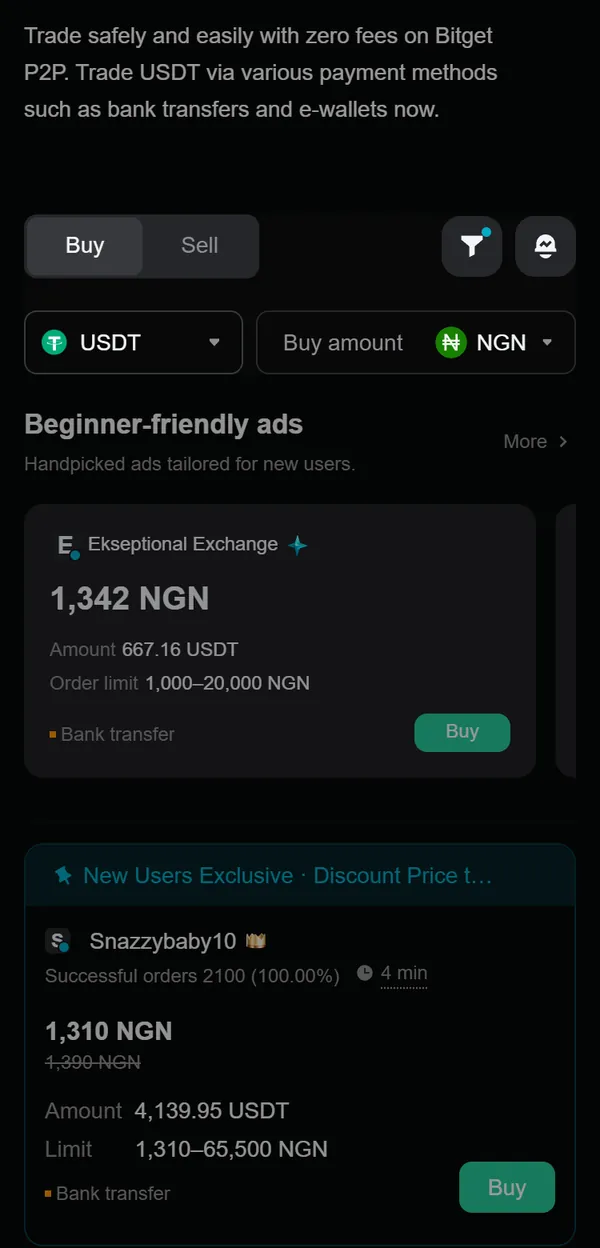
- Pick a seller. Compare price, order limit and payment method. Beginner-friendly ads have small limits that suit a first test order; some ads also show a new-user discount price. An ad marked "Verification required" has extra seller requirements.
- Tap Buy. The first time, Bitget checks your verification, phone and email, and asks you to add whatever is missing.
- Pay on time. Pay from an account in your own name, leave the note empty, finish within the payment window and only then tap Paid. The seller releases the USDT when the money arrives.
P2P purchases come with a T+1 security hold: the USDT you buy can be withdrawn once the hold lifts, automatically. Start with a small first order. Bitget is not always the cheapest, so compare first: USDT to NGN rates, Bitget P2P rates by country or the seller finder.
Not signed up yet? Open Bitget sign-up
Is Bitget working normally?
On 24 September 2026 Bitget detected unauthorised transfers from its wallets and paused withdrawals. Reported losses were about $387.5 million; Bitget said user balances were not affected and its Protection Fund would cover the loss. Withdrawals came back in stages: Bitcoin on 28 September, Ether on 29 September, USDT on 30 September, with other tokens, fiat and P2P scheduled for 2 October. When we checked on 2026-10-21, Bitget P2P ads were showing and open for orders. Whatever exchange you use, do not leave large balances there longer than you need to.
Common questions
Do I need an ID to create a Bitget account?
Not to create it. Deposits, trading, withdrawals and P2P all need identity verification with your own ID and a face check.
Is Bitget available in India?
No. Bitget’s verification page lists India among the countries it does not serve, together with the US, Canada, Japan, Singapore, Hong Kong, France, Germany, Italy, Spain, Austria and others. If your country cannot be selected during verification, Bitget does not serve it.
Where do I enter the referral code, and can I add it later?
With the button on this page the referral code is filled in and locked for you. In the Bitget app, type it in the "Referral code" field when you sign up. Bitget does not say a code can be added afterwards, so treat it as sign-up only.
Why does P2P ask me to add an email?
Before your first P2P order Bitget checks three things: identity verification, a linked phone number and a linked email. If you signed up with a phone, add your email in the Security Center first.
Why can I not withdraw the USDT I just bought on P2P?
Bitget puts P2P buy orders under a T+1 security hold. The hold lifts automatically; spot and futures trading are not affected.
How long does Bitget verification take?
Bitget says usually within an hour and no more than 4 hours. If it takes longer, contact support with your UID.
Why was my verification rejected?
Blurry or cropped ID, glare, black-and-white copies or screenshots, a hat, glasses or mask in the face check, or details that do not match the ID. You can resubmit up to 5 times in 24 hours.
Why are withdrawals blocked after I changed my phone or authenticator?
Changing or removing your authenticator, phone, email, fund password or login password disables payments and withdrawals for 24 hours as an anti-theft measure. It lifts automatically.
Does Bitget charge fees on P2P?
Bitget advertises zero-fee P2P trading. Your cost is the seller’s price, so compare rates before you buy.
Can I have more than one Bitget account?
You can complete identity verification on only one account, and you must be 18 or older.