Prices have not refreshed for a while. You are seeing the last rates we received.
How to create a Bybit account on your phone
Creating a Bybit account takes a few minutes. Verification usually takes about 15 minutes, and you need it: an unverified Bybit account cannot deposit, trade or use P2P. This guide covers the sign-up screens, the ID options for Nigeria, India and Pakistan, and your first USDT on Bybit P2P.
Steps checked: 2026-10-21, against the live sign-up page and Bybit’s help center.
What you need
| Nigeria | India | Pakistan | |
|---|---|---|---|
| ID | BVN or NIN (no ID photo), or international passport | Aadhaar via DigiLocker (or passport) plus PAN | CNIC or passport |
| Phone format | +234, drop the leading 0 (0803… → 803…) | +91, 10 digits | +92, drop the leading 0 (0300… → 300…) |
| Common P2P payments | Bank transfer, OPay, PalmPay | UPI, IMPS, bank transfer | Easypaisa, JazzCash, SadaPay, NayaPay, bank transfer |
- An email address. Bybit recommends signing up with email, because withdrawals need email plus Google Authenticator.
- You must be 18 or older, and one person can verify only one account.
Can you use Bybit where you live?
Bybit’s restricted-countries list (help center, checked 2026-10-21) covers: the United States, mainland China, Hong Kong, Singapore, Canada, North Korea, Cuba, Iran, Uzbekistan, Crimea and Sevastopol, the non-government-controlled areas of Donetsk, Luhansk, Kherson and Zaporizhzhia, Sudan and Syria, plus Dubai for one specific Bybit entity. Nigeria, India and Pakistan are not on it.
Use your real country and your own ID. Bybit’s terms let it close accounts that misstate their location, so a VPN or a "pick another country" trick puts your money at risk. In parts of Nigeria some networks have blocked the website at times; if it does not load, try mobile data or the official app, never a mirror site from a chat group.
Step 1: Open the sign-up page
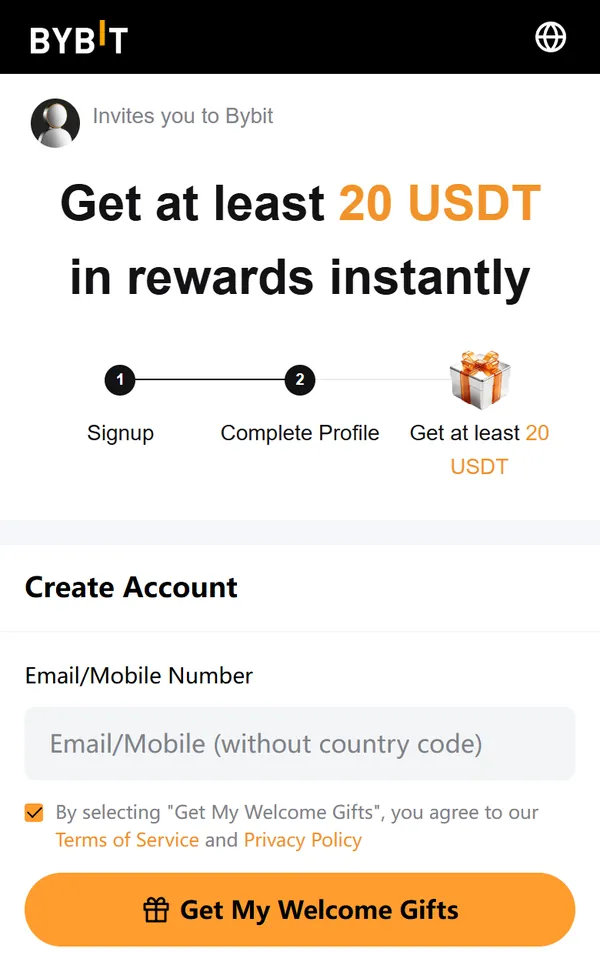
The button below opens Bybit’s sign-up page with the referral code 120953 already in the link, so the page does not even show a referral field. The top of the page says "Invites you to Bybit" and shows the current welcome offer; reward terms change, so check them on Bybit itself.
For the app, use Google Play or the App Store. If your store does not have it, download the APK only from bybit.com, and switch "install unknown apps" off again afterwards.
Step 2: Enter your email or phone
- Email (recommended): Gmail, iCloud or Proton Mail work well.
- Phone: choose the country code, then type the number without the leading 0. This is the most common reason codes never arrive.
The Terms of Service box is ticked by default. Tap the orange button. Google, Apple and Telegram sign-up also work. Each email or phone number can be used for only one account.
Signing up without our link? Under the email field there is a "Referral Code (Optional)" dropdown. Enter the code before you tap sign up; Bybit says it cannot be added, changed or removed afterwards.
Step 3: Puzzle and code
Slide the puzzle piece into place, then enter the code. Phone codes may arrive by SMS or WhatsApp, and Bybit says that once you pick a channel the first time, it cannot be switched.
Step 4: Set a password
Use 8 to 30 characters with at least one uppercase letter, one lowercase letter and one number. In a recent app version you can add a passkey (fingerprint or face) instead, with a password as the fallback.
Step 5: Verify your identity
Tap your profile, then Verify Now. Choose your country of residence; changing it later needs extra review. Then follow your country’s route:
- Nigeria: choose BVN or NIN, enter the number and do the liveness check. No ID photo is needed. You can also use an international passport through the normal flow.
- India: log in to DigiLocker, enter your Aadhaar number, confirm with OTP and PIN, allow sharing, then do the face check. Indian users also fill in a short questionnaire (income, source of funds, occupation, address) and add their PAN. One PAN works for one Bybit account only.
- Pakistan: photograph your CNIC front and back, or your passport, then do the face check. Use the original card in colour, all four corners visible.
Most checks finish in about 15 minutes, at most 48 hours. Bybit has three levels: Standard (ID and face; unlocks deposits, trading and P2P, and withdrawals of up to 1 million USDT a day), Advanced (proof of address from the last 3 months) and Pro (proof of income). Standard is all most people need.
Step 6: Secure your account
- Google Authenticator: required for withdrawals. Write the backup key on paper.
- Passkey: faster and phishing-resistant logins.
- Anti-phishing code: real Bybit emails will show it; emails without it are fake.
- Withdrawal whitelist (optional): only saved addresses can receive withdrawals.
Troubleshooting
The email code does not arrive
Check spam and promotions and add Bybit’s sender address to your contacts. If you requested too many codes, wait about 15 minutes before trying again.
The phone code does not arrive
Check the country code and remove the leading 0. Look in WhatsApp as well as SMS. Clear a full SMS inbox, try the other SIM slot, or restart the phone.
"Service not available in your region"
The country you chose, or your network location, is on the restricted list. Do not use a VPN to get around it.
It says the account already exists
Each email or phone number can have one account. Log in and use Forgot password.
I forgot the referral code
It cannot be added afterwards. Do not open a new account for it: you can verify only one.
Verification was rejected
Blurry, cropped or glare-covered photos, screenshots or black-and-white copies, an expired ID, a face that does not match, or a second account are the usual reasons. Read the reason in the email and resubmit. After 5 rejections in 24 hours you must wait 24 hours.
The face check keeps failing
Use good light, keep only your face in the frame and turn your head slowly. If it still fails, wait 30 minutes and try again.
Buy your first USDT on Bybit P2P
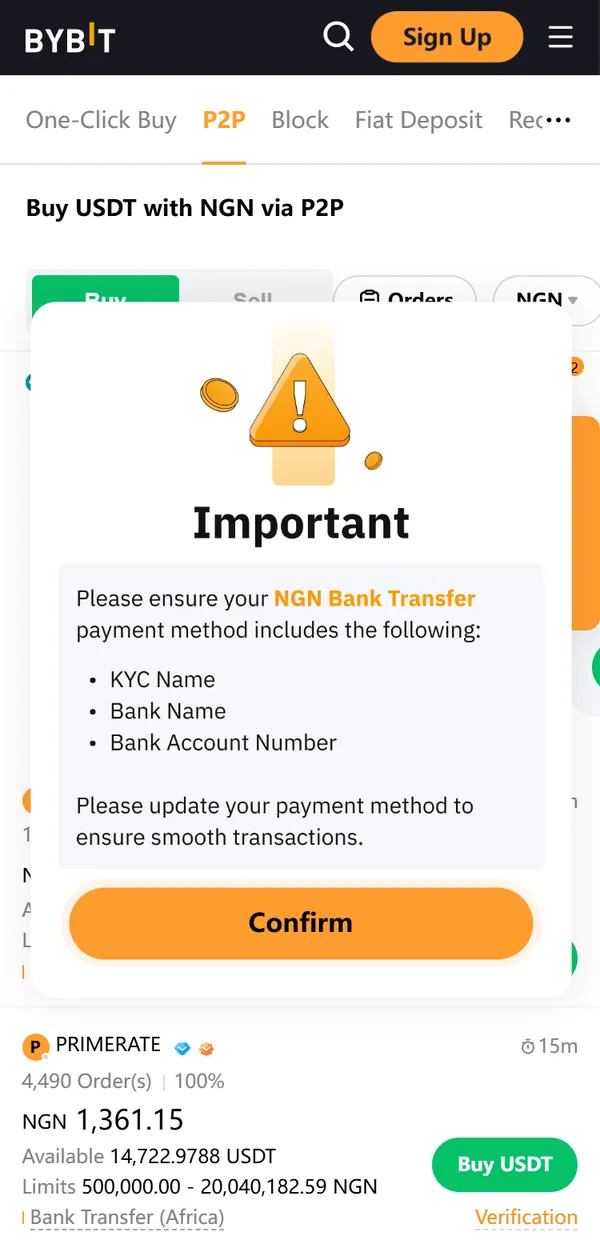
Open Buy Crypto, then P2P. Choose Buy, USDT and your currency, and filter by payment method. Nigerian users first see a reminder about their bank-transfer details:
- Pick a seller with many orders and a high completion rate. "Featured" ads are paid placements, not necessarily the best price. Ads marked "Verification" have extra seller checks.
- Enter the amount and tap Buy USDT.
- Pay the account shown in the order, from an account in your own name, with no "USDT", "BTC" or "crypto" in the note. Only after paying tap Payment Completed.
Cancelling too many orders in a day blocks P2P for 24 hours, and some high-risk orders delay withdrawals for 24 hours, so only open an order you will pay. Compare before you buy: USDT to NGN rates, USDT to PKR, USDT to INR, or Bybit P2P rates by country.
Not signed up yet? Open Bybit sign-up
Common questions
Can I use Bybit in Nigeria, India or Pakistan?
Yes. None of the three is on Bybit’s restricted-countries list (checked 2026-10-21), and Bybit P2P has naira, rupee and Pakistani rupee sellers. Sign up with the country you really live in.
Can I use Bybit without KYC?
Barely. Bybit’s own table says an unverified account cannot deposit, trade or use P2P; it can only withdraw small amounts. Verify before you plan to buy.
Which documents work for Bybit verification in Nigeria?
Nigeria has a local option: enter your BVN or NIN and do a face check, with no ID photo needed. An international passport also works through the normal document flow.
Do I need PAN for Bybit in India?
Yes. Indian users verify with Aadhaar through DigiLocker (or another ID), answer a short questionnaire and add their PAN. One PAN can be linked to only one Bybit account.
Can I use my CNIC in Pakistan?
Pakistan has no special local option, so you use the normal flow: photograph your CNIC (front and back) or passport, then do the face check.
How long does Bybit verification take?
Usually around 15 minutes, at most 48 hours according to Bybit.
Where do I enter the Bybit referral code, and can I add it later?
Through the button on this page the code 120953 is already in the link. Signing up elsewhere, open "Referral Code (Optional)" under the email field and type it before you tap sign up. Bybit says a referral code cannot be added, changed or removed after the account is created.
Why do I not get the verification code?
Most often the phone number still has its leading 0 or the wrong country code. Also check spam for email, and check WhatsApp: Bybit may send phone codes there.
Can I open a second Bybit account or buy a verified one?
No. One person can verify one account, and bought or borrowed verified accounts get frozen. Sites selling "verified Bybit accounts" are a scam.
Can I deposit naira directly?
Use P2P: you pay a seller by bank transfer or a wallet such as OPay or PalmPay, and the USDT lands in your Bybit account.